
Your client doesn’t read diffs.
explain-to-customer is an agent skill for Claude Code that turns your change into a short video, a few slides, a diagram and a message they will actually read. One command, rendered on your machine.
npx skills add halitsever/explain-to-customer$ git diff --stat main app.js | 31 ++++++++++++++++----- messages.js | 5 +++++ + emailInvalid: "That email address doesn't look right…", + passwordShort: "Password must be at least 8 characters.", + retry: "Try again", > /explain-to-customer all rendering video 43.5 s, 4 slides, 1 diagram, message.md QA passed on every frame
One storyboard, twenty-one looks.
Pick a style per client. The scenes stay the same and only the look changes. Or let it match your project: your own colours, fonts, radius and logo, read straight from the repo.
Modern SaaS
Clean & friendly
Bold & creative
Extended
What lands in your client’s inbox
Everything is written for the person paying for the work, in their language, with your product's real wording. You review it, then send it.
- Video
- 30 to 60 seconds with captions, 1080p, small enough to attach to an email.
- Slides
- Three to five images. The first one tells the whole story on its own.
- Diagrams
- Flows and sequences as SVG and PNG, with the editable Mermaid source.
- Message
- A short note that says what changed and what they need to do, often nothing.
- To
- [Customer name]
- Subject
- Clearer error messages on sign-up
Hi [Customer name],
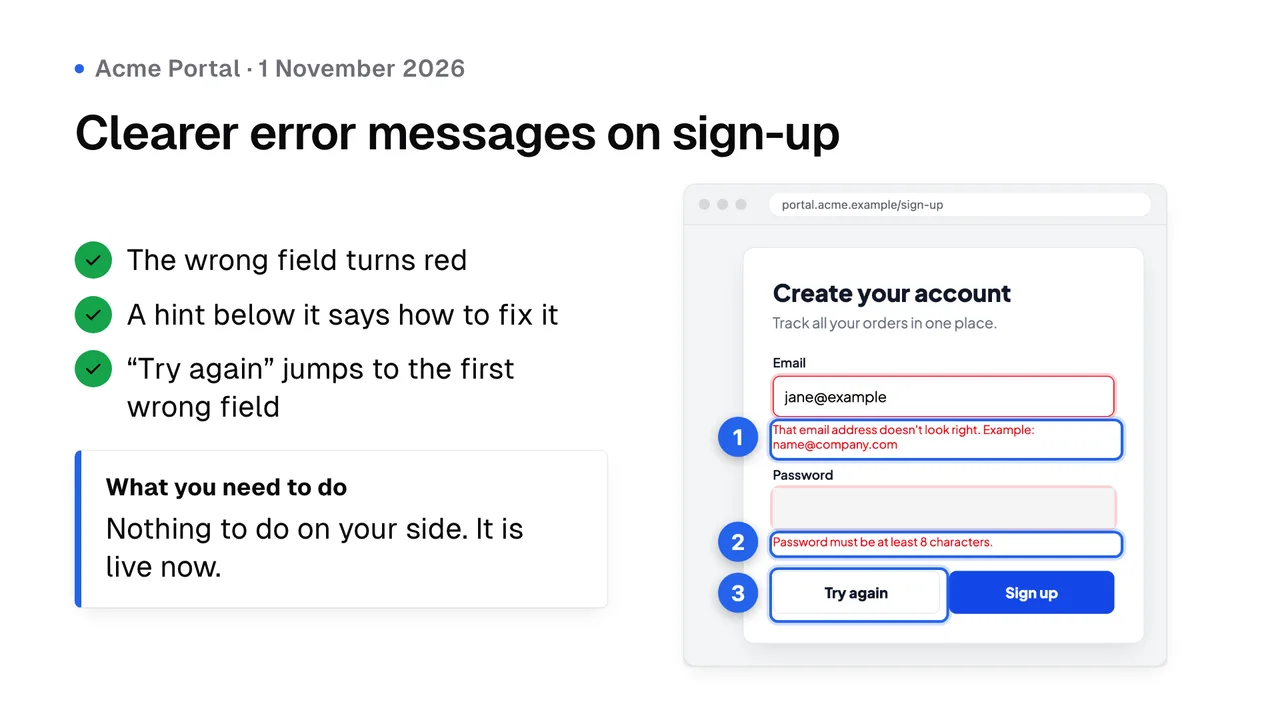
We improved the sign-up form in Acme Portal. Before, any mistake showed one generic message, “Something went wrong. Please try again.”, so users had to guess what to fix. Now the wrong field turns red and a hint right below it explains how to fix it.
What's new
- Email: “That email address doesn't look right.” with a correct example
- Password: “Password must be at least 8 characters.”
- A new “Try again” button that jumps to the first field to fix
What you need to do
Nothing on your side. It is live now.
Best regards,
[Your name]
How a run goes
Type /explain-to-customer in Claude Code. The skill runs these steps and stops once, to show you the storyboard.
Finds the change
Your branch since it left main, your uncommitted work, or the last commit. A commit range, a PR or a sentence works too.
Asks four questions
What to make, where to save it, which style, and whether to screenshot your running app. Your last answers are remembered.
Writes the story
Claude reads the diff and the code around it, quotes your real button labels and error messages, and drafts the scenes and the message.
Waits for your approval
You see the storyboard first. Render it, make it shorter, add detail or switch the style.
Renders on your machine
Screenshots with numbered callouts, then the video, slides and diagrams. Nothing is uploaded.
Checks every frame
Clipped text, contrast, missing letters, blank frames, leftover placeholders and leaked secrets get fixed before you see them.
Hands you a folder
Video, slides, diagrams and a message ready to paste into email or WhatsApp.
Honest by default
Stays off the screen
- Secrets, API keys and tokens
- Internal URLs, hostnames and stack traces
- Real customer data and other clients’ names
- Features, numbers or dates nobody built
Checked before you see it
- Text that clips or runs off the frame
- Contrast below WCAG AA
- Fonts that failed to load and missing accents
- Blank frames and leftover placeholders
Install it once
Then type /explain-to-customer in any project. The first run asks before it downloads the rendering tools, about 250 MB, into a cache folder outside your project.
npx skills add halitsever/explain-to-customer -g -a claude-codeNeeds Claude Code, Node.js 22 or newer and FFmpeg. Works on macOS, Windows, Linux and WSL.